SizeVault

Every customer's fit, one search away.

Save measurements, or scan a paper card and let it fill them in for you. See them on a 3D mannequin, then send them to WhatsApp or as a PDF in one tap. No more paper cards, no more digging through old chats.

Free to start. No card required.

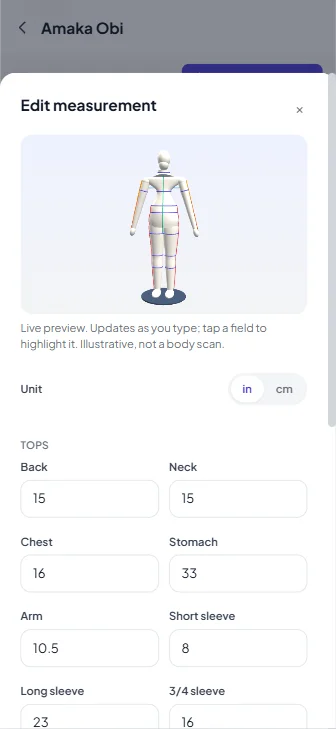
SizeVault's Edit measurement sheet with a live 3D mannequin preview above the measurement fields
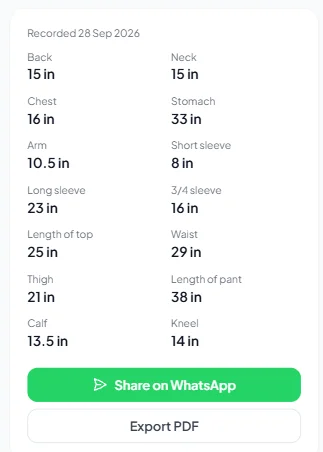
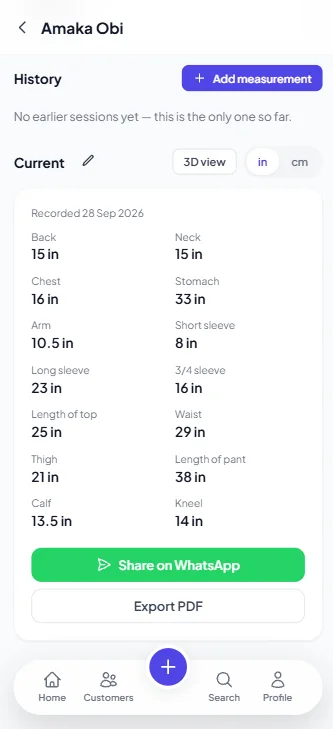
SizeVault customer page showing current measurements with Share on WhatsApp and Export PDF buttons
Customers
Measurements
History
Scan card
3D viewer
WhatsApp
PDF export

Everything you need, nothing you don't

A simple tool built around how tailors actually work.

Full measurement history

Every session is saved. See how a customer's measurements have changed over time, not just the latest numbers.

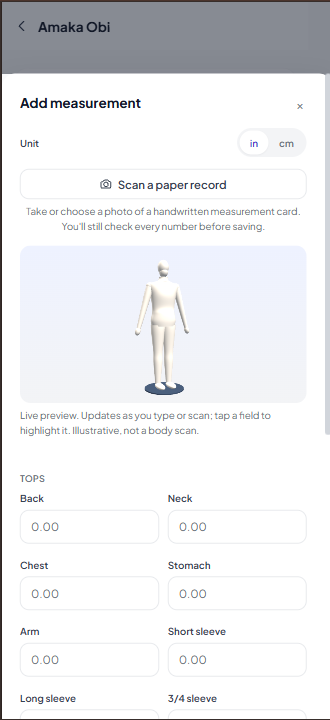
Scan a paper record

Photograph a handwritten measurement card and the fields fill themselves in. You still check every number before saving.

Switch inches or centimeters

Enter and view every measurement in whichever unit you prefer, converted instantly.

Unlimited customers

Add as many customers as your business needs, with fast search by name or phone number.

Private by default

Your customer list is yours alone. Every account is fully isolated, with no one else able to see your data. Scanned photos are never stored.

Works on any device

Add it to your home screen and use it like an app, on your phone in the shop or your desktop at home.
Already have it on paper? Just take a photo.

Tailors keep years of paper measurement cards. Photograph one and SizeVault reads the numbers straight into the fields, so switching over doesn't mean retyping every customer by hand.

Works with handwritten or printed cards, in inches or centimeters.

Reads the customer's name off the card too, if it's written there.

Every value lands in the form for you to check before saving, nothing is saved automatically.

The photo itself is never stored, only used for that one read.

SizeVault's Add measurement sheet with the Scan a paper record button and a banner confirming values were read from a photo
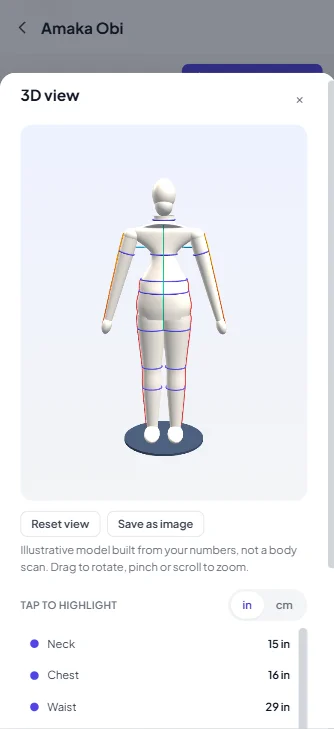
SizeVault's 3D view: a mannequin built from a customer's measurements, with Reset view and Save as image buttons and a tap-to-highlight measurement list

See the fit before you cut the cloth.

Numbers on a list are easy to mistype and hard to picture. Open any customer in the 3D view and check their proportions at a glance. It is built from the measurements you already saved, whether typed or scanned, so there is nothing extra to enter.

Drag to rotate, pinch or scroll to zoom.

Tap a measurement in the list to highlight it on the model.

The Edit sheet previews live, updating the model as you type or scan.

Save the view as an image whenever you need it.

An illustrative model built from your numbers, not a body scan.

Send it the way your customers already talk.

Share a customer's current measurements on WhatsApp, or export a PDF for your records, your apprentice, or your fabric supplier. Both are one tap from the customer's page.

A customer's current measurements with the Share on WhatsApp and Export PDF buttons

Up and running in minutes

1

Create your account

Sign up with your name and email. No setup, no waiting.

2

Add your customers

Enter a name and phone number for each customer as you go.

3

Record and share

Type the measurements or scan a paper card, check the 3D view, then send on WhatsApp or export a PDF.

Frequently asked questions

Is my customer data private?

Yes. Every account is fully separate. No other tailor using SizeVault can see your customers or their measurements.

Does it cost anything?

Creating an account and adding customers is free.

Can I scan a paper measurement card instead of typing?

Yes. Open a customer, tap "Scan a paper record", and take or choose a photo. The fields fill in automatically, and you check every value before saving. The photo itself is never stored.

What is the 3D view?

It builds a 3D model from a customer's saved measurements. You can drag to rotate, pinch or scroll to zoom, and tap a measurement to highlight it. It is illustrative, not a body scan.

How do I send a customer's measurements?

Open the customer's current measurements, then tap Share on WhatsApp or Export PDF.

Can I save the 3D view?

Yes. The 3D view has a Save as image button.

Can I use it on my phone?

Yes. SizeVault works in any mobile browser, and you can add it to your home screen for a full app-like experience.

What if I already have customers written down on paper?

You can add them one at a time as you go, at your own pace, and use the scan feature to speed that up. There is no need to enter everyone at once.

Can I switch between inches and centimeters?

Yes, every measurement can be entered and displayed in either unit.

Ready to leave the paper cards behind?

Create your free account and add your first customer today.

Get started, it's free